Tap-Test "Monument Tool" (e.g. their most popular tool or one that never leaves the ATC) to baseline the spindle. Preferable use a 2 or 4 tooth indexable milling cutter in the same holder for ease and repeatability of tapping.
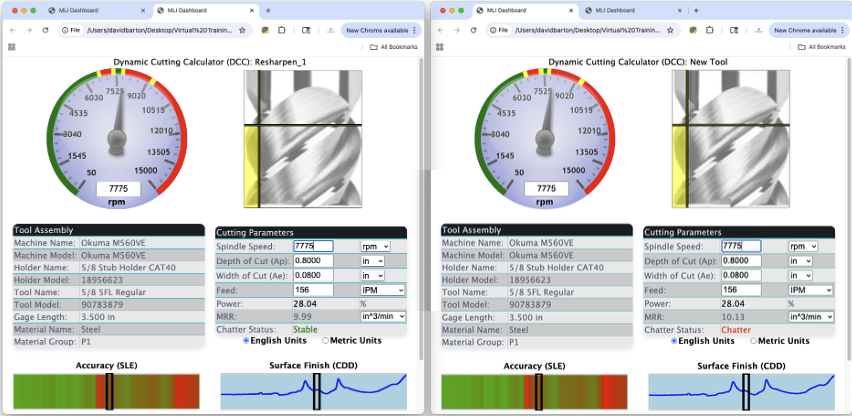
Periodically tap-test the same tool and generate a Dashboard. Comparing it to the baseline Dashboard, if the tool that was once green and stable is now red with the same parameters, that would be an indicator that servicing the spindle is required.
Save the Dashboards in a folder. The automatically generated file names contain the date and time of each measurement. If the resulting Dashboard requires reductions in the program speed or cutting depths, make a cost per cubic inch calculation vs. spindle repair cost to determine if the spindle should be serviced.
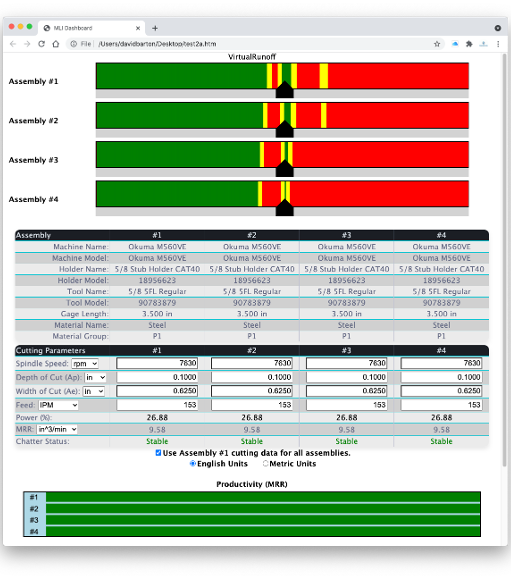
Load the Dashboards into VirtualRunoff to show the spindle change over time. Also after a crash you can determine if the spindle needs serviced by the change in the performance shown on the Dashboard.